Overview › Forums › Discussions › Virus detected in latest build
- This topic has 3 replies, 1 voice, and was last updated 1 week, 1 day ago by
Abbie.
-
AuthorPosts
-
danskimo1
GuestThe latest build was flagged as malware by my antivirus. I downloaded it directly from the official source.
File: Anytxt_1.3.3541_Windows_X86_64.exe
Detection: Ransom:Win64/BlackBasta!rfnThis is a particularly serious detection, as Black Basta is associated with ransomware and can potentially cause significant damage to an affected system.
What should I do now? Is this a false positive, or has the installer potentially been compromised?
Abbie
ModeratorHello, this is a false positive.
Could you please tell me which antivirus software you are using?
Alex Cotton
Guest<p>I also had a virus warning from my company (which also automatically removed AnyTXT). Any idea when a new release will come that negates the false positive warning? Message from my security department below:<br />———————————————————————————————————————–</p><p>Dear @Alex Cotton</p><p>The Security Operation Center has detected suspicious activity connected to your account and/or machine which is in violation with the Atos Acceptable Use Policy.</p><p>DETECTED ACTIVITY<br />Source: Microsoft Defender for Endpoint<br />Alert: An active ‘BlackBasta’ ransomware in a registry value was detected and removed<br /> <br /> ACTIONS FOR END USER:<br />Please review the details presented in the table below and do the following:<br />Review the Security Alert Details section below.<br />Double check if the affected file has been removed from your workstation (if not done automatically yet – see Remediation status below).<br />Respond to this email and confirm if you are aware of the file presence in your system.<br />If yes, provide the reason why this malicious content was present in your system.<br /> <br /> SECURITY ALERT DETAILS:<br />Generated on: Oct 26, 2026 9:43:19 PM<br />Device: laptop-ipuaetac<br />User: alex cotton<br />Sensitive user: No<br />File path: C:\Program Files\Anytxt Searcher\ATGUI.exe<br />Category: Category<br />Remediation action: Quarantine<br />Remediation status: Success<br />Severity: High<br />Details:<br /> What action the script or command performs:<br />Defender’s SenseIR.exe launches a signed, non-interactive PowerShell data-collection script as SYSTEM. During that investigation the script accesses ATGUI.exe, which triggers antivirus inspection.</p><p> Why it was detected by the security mechanism:<br />Defender classified ATGUI.exe as Ransom:Win64/BlackBasta!rfn when PowerShell attempted to open it. Defender also found an associated HKCU\…\Run\Anytxt persistence value and removed both successfully.</p><p> What potential risks may be associated with it:<br />High risk. The detected executable is classified as ransomware and has associated user-logon persistence. Potential ransomware impact is serious, but actual encryption, lateral movement, or successful ransomware execution is not demonstrated by the supplied evidence.</p><p> Whether the observed activity could have a legitimate business or administrative justification:<br />The SenseIR/PowerShell activity: yes. Its parentage, Defender paths, SYSTEM context, and DataCollection script strongly support legitimate Microsoft Defender investigation activity. The ATGUI.exe ransomware detection and Run-key persistence: no legitimate justification is established by the supplied evidence.</p><p>Alert ID: da954949c0-0c11-4bbe-9880-990bd3d60c8f_1<br />———————————————————————————————————————–</p>
ModeratorHello.
Your security system has flagged Anytxt’s auto-start-on-boot behavior as a potential threat.
please disable this by going to Options -> Auto start at Boot and turning it off.
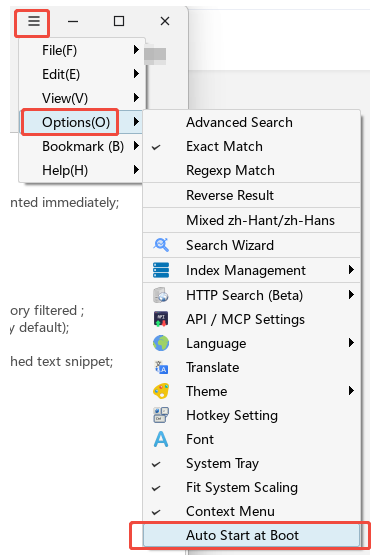
Thank you.
-
AuthorPosts