Overview › Forums › Discussions › Suggestion – exclude drives or folders
- This topic has 4 replies, 1 voice, and was last updated 1 month, 3 weeks ago by
Abbie.
-
AuthorPosts
-
Val
GuestHi,
I would like to suggest a feature – to be able to exclude some drives or folders from indexing. For example, I have a backup drive and Windows File History set up to save every change of every file (every version). So if I am looking for something, i want to search only system drive (and not having to make selection every time) – just exclude the backup drive altogether. Then when i search it will not be showing hundreds of duplicates from the backup versions.
Abbie
ModeratorHello,my friend.
Anytxt has an exclusion function,you can do the following:
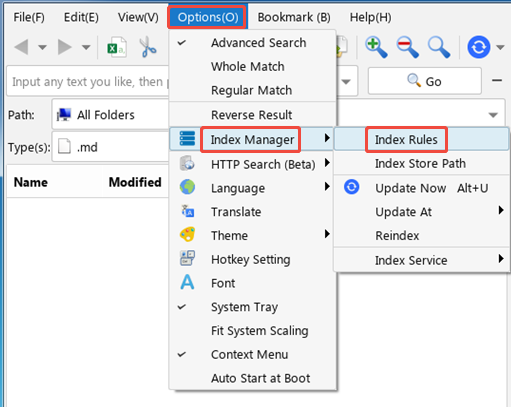
Options->Index Manager->Index Rules
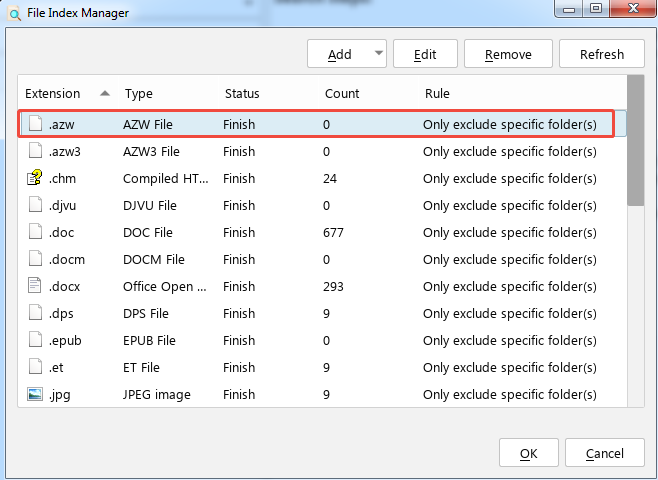
Select the file type and double-click it.
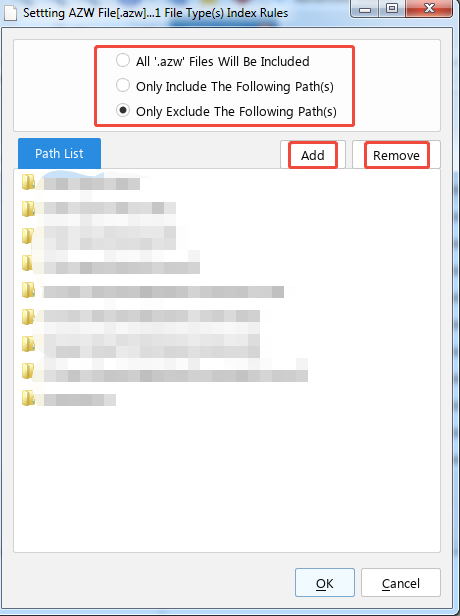
Add/remove directories that you want to include/exclude
Thank you.
Val
GuestOne of us is missing the point. I suggested to exclude entire drive or a folder. It might have hundreds of different file extensions, hundreds of thousands of files. Am I supposed to predict every possible file extension that might be ever added to that folder and then manually exclude that file type one by one? Something does not make any sense or one of us does not get it.
Peter
GuestI’ve just installed anytxt and I’ve come across this issue. I have a dozen different drive letters, but I’m only interested in indexing 2 of them. What I’ve done for the moment is select all the extensions and add each drive letter to the ‘exclude’ options. But as Val says, what happens when a new extension appears? I presume anytxt will go off and look for it everywhere, including in the non-indexed drives?
I’d like to see something like a global “always exclude the following paths” option (but I accept that the many possible combinations may make it hard to design a good interface that works for everyone!).
ModeratorOkay, my friend.
We understand your suggestion,you need a global search range option.
The search rules will be upgraded and optimized,Please look forward to future versions.
Thank you for your support.
-
AuthorPosts